Creating Personalized Depth: A Guide to Custom Name Monogram 3D Shadow Box SVGs
In the evolving world of digital crafting and home decor, the desire for personalized items has never been stronger. Among the most trending projects for creators using cutting machines is the Custom Name Monogram 3D Shadow Box SVG. This design approach transforms flat materials into dimensional art, offering a sophisticated look that rivals store-bought decor. Whether you are a hobbyist looking to gift a handmade item or a small business owner expanding your product line, understanding the mechanics and potential of these layered files is essential.
Understanding the Mechanics of Layered Design
At its core, a 3D shadow box design relies on the principle of layering. Unlike a standard vinyl decal that sits flush against a surface, a shadow box utilizes multiple cut layers stacked upon one another to create depth, shadow, and visual interest. The Custom Name Monogram 3D Shadow Box SVG typically consists of several distinct pieces that must be assembled in a specific order.
For instance, a comprehensive design package often includes 9 numbered layers. These numbers are not arbitrary; they serve as a critical guide for the assembler. Layer 1 might be the base background, while subsequent layers build up the monogram letters, decorative elements like rainbows or florals, and finally, the top frame or accent pieces. This numbering system eliminates guesswork, ensuring that even beginners can achieve a professional finish without misaligning the intricate details.
The magic happens in the assembly. By adhering these layers with foam adhesive tabs or thick glue dots, you create physical space between the sheets of cardstock. This space catches light and casts shadows, giving the monogram its namesake "shadow box" effect. The result is a piece of art that changes appearance slightly depending on the viewing angle and lighting conditions.
The Importance of File Formats and Compatibility
One of the most significant advantages of purchasing a high-quality digital design is versatility. Creators use a wide array of hardware and software, from Cricut Explore and Maker machines to Silhouette Cameo and professional CNC plotters. A robust file package ensures that the Custom Name Monogram 3D Shadow Box SVG is accessible to everyone, regardless of their preferred toolset.
A complete download should ideally provide the following formats:
- SVG (Scalable Vector Graphics): The industry standard for Cricut Design Space and Silhouette Designer Edition. This format preserves vector data, allowing for infinite scaling without loss of quality.
- DXF (Drawing Exchange Format): Essential for users with the basic version of Silhouette Studio or those operating CNC machinery. It breaks the design down into precise cut paths.
- Silhouette Studio File: A native file specifically prepared for seamless integration with Silhouette software, often including pre-set cut settings.
- EPS (Encapsulated PostScript): Compatible with professional graphic design suites like Adobe Illustrator, Corel Draw, and Inkscape. This is vital for designers who need to modify the vector nodes before cutting.
- PNG (Portable Network Graphics): While not a cut file, a high-resolution PNG with a transparent background is invaluable for sublimation projects, digital mockups, or printing directly onto other mediums.
Having access to these varied formats means the design is future-proof. If you upgrade your software or switch machines, your library of designs remains usable.
Material Selection and Sizing Considerations
Successfully executing a 3D shadow box project requires more than just the right digital file; it demands appropriate physical materials. Most Custom Name Monogram 3D Shadow Box SVG files are optimized for standard cardstock. Specifically, many designs are sized to fit an 8.5 x 8.5-inch inner frame, utilizing standard 8.5 x 11-inch sheets of cardstock. This sizing is strategic, minimizing waste and ensuring that the layers fit perfectly within readily available craft store frames.
However, flexibility is key. High-quality vector files are scalable. If you wish to create a large statement piece for a nursery or a small keepsake for a desk, you can resize the design in your software. It is important to note, however, that when scaling up significantly, you may need to adjust the number of layers or the thickness of the adhesive spacers to maintain the proportional depth of the shadow effect.
Pro Tip: When selecting cardstock, opt for a weight between 65lb and 80lb. Lighter paper may warp under the tension of multiple layers, while excessively heavy chipboard might be difficult to cut in intricate detail without a specialized knife blade.
Personalization: Adding the Human Touch
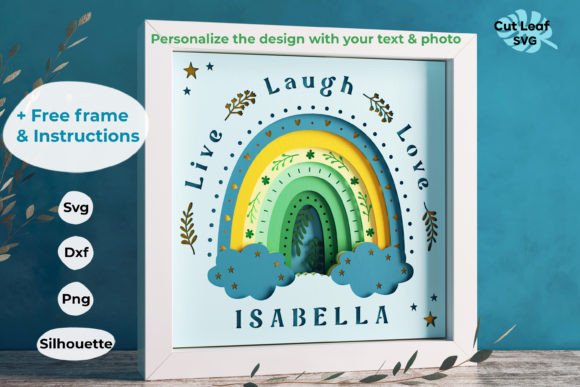
The true value of a monogram design lies in its customizability. A generic "Live Love Laugh" sign is pleasant, but a sign featuring a specific family name or a child's initials holds emotional resonance. Many advanced file packages include a separate set of alphabet letters alongside the main design.
This allows the creator to swap out the placeholder text in the SVG file with any name desired. The process usually involves ungrouping the existing text in your design software, deleting the placeholder, and typing in the new name using the included font or a matching system font. Because the layers are pre-numbered and grouped logically, replacing the text does not disrupt the layering order of the surrounding decorative elements, such as rainbows or floral borders.
Practical Applications and Use Cases
The versatility of the Custom Name Monogram 3D Shadow Box SVG extends far beyond simple wall art. Understanding where these designs can be applied helps creators maximize their investment in digital assets.
- Nursery and Kids' Room Decor: Soft colors and whimsical elements like rainbows make these shadow boxes perfect for naming a newborn's space. The 3D element adds a tactile quality that engages young children.
- Wedding and Event Signage: Couples often use these designs for welcome signs at weddings or bridal showers. Using metallic or pearlescent cardstock can elevate the look to match formal event themes.
- Small Business Inventory: For Etsy sellers and craft fair vendors, these files offer a high-margin product. The perceived value of a handmade, 3D item is significantly higher than a flat print, allowing for better pricing strategies.
- Memorial and Sympathy Gifts: A tastefully designed monogram shadow box can serve as a dignified memorial piece, honoring a loved one with their name and significant dates layered in elegant script.
Evaluating Suitability for Your Project
Before diving into a project, it is wise to evaluate if this specific type of design fits your current needs and skill level. While the inclusion of a PDF instruction guide and a Layers Guide simplifies the process, 3D assembly does require patience. You must be comfortable with weeding small details, aligning multiple sheets of paper, and applying adhesive consistently.
If you are new to layering, start with a design that has fewer layers or larger distinct sections. As you gain confidence, you can tackle the more intricate 9-layer designs that offer deeper shadows and complex imagery. Additionally, consider the environment where the piece will hang. Shadow boxes protrude from the wall; ensure the location has enough clearance so the artwork isn't knocked or damaged.
Maximizing Value with Included Resources
The best digital purchases are those that provide a complete ecosystem for creation. A premium Custom Name Monogram 3D Shadow Box SVG package should not stop at the cut files. The inclusion of a free frame template or specifications for an 8.5 x 8.5 inner size frame saves the user from hunting for compatible hardware. Furthermore, detailed instructions on shadow box making—covering everything from glue selection to framing techniques—bridge the gap between having a file and finishing a product.
By leveraging these resources, creators can focus on the artistic aspects of color selection and material choice rather than struggling with the technicalities of construction. Whether you are using a Cricut, a Silhouette, or a laser cutter, the foundational work is done by the designer, leaving you free to bring the vision to life.
In conclusion, the Custom Name Monogram 3D Shadow Box SVG represents a perfect intersection of technology and traditional craftsmanship. It empowers users to create deeply personal, visually stunning decor with professional results. With the right files, clear instructions, and a bit of creativity, the possibilities for unique, layered art are limitless.