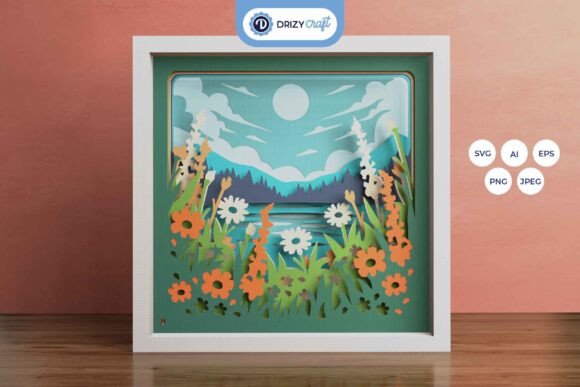
Wildflowers on the Mountain 3D Layered Art Guide
There is a distinct satisfaction in transforming a flat sheet of paper into a scene that breathes with depth and dimension. The Wildflowers on the Mountain 3D Layered project represents more than just a craft; it is an exercise in spatial design and patience. This specific template, designed as a square paper-cutting layout, invites creators to explore the nuances of shadow and light through nine distinct layers. Whether you are a seasoned papercut artist or a hobbyist looking for a meaningful weekend project, this template offers a structured yet flexible foundation for creating stunning visual art.
The core appeal of this design lies in its versatility. You receive the template in multiple formats, including AI, EPS, PNG, SVG, and JPEG, ensuring compatibility with both digital design software and physical cutting machines. The inclusion of an SVG file is particularly valuable for users of Silhouette, Cricut, and other automated cutters, allowing for precise execution of intricate details. However, the design does not exclude traditionalists; those who prefer the tactile feel of an art knife and scissors can easily print the high-resolution JPEG or PNG previews to use as a manual guide. At a size of 20.32×20.32 cm (approximately 8x8 inches), the finished piece is substantial enough to make a statement on a wall yet compact enough to fit into standard framing options.
Understanding the Depth of Layered Design
What makes the Wildflowers on the Mountain 3D Shadow Box truly interesting is how it manipulates perception. With nine separate layers, the design creates a parallax effect that changes depending on the viewer's angle and the lighting conditions. This is not merely a picture of flowers; it is a topographical map of a meadow rendered in paper. Each layer adds a specific plane of depth, separating the foreground wildflowers from the mid-ground foliage and the distant mountain backdrop.
For designers and educators, this template serves as an excellent case study in composition. It demonstrates how spacing between layers—often achieved using foam tape or glued spacers—can dramatically alter the final look. A gap of just a few millimeters can cast soft shadows that enhance the three-dimensional illusion, while wider gaps create a more dramatic, theatrical effect. Understanding this relationship between layer count and spacing is crucial for anyone looking to adapt this concept for other projects.
Creative Applications and Project Variations
The utility of this template extends far beyond a simple framed picture. Because the files are resizable (provided you maintain the aspect ratio), you can scale the design up for a large foyer installation or down for a delicate gift box lid. Here are several practical ways to adapt this design for different goals and audiences:
- The Illuminated Lightbox: Perhaps the most popular variation is converting the shadow box into a lightbox. By inserting LED strip lights between specific layers—typically behind the foreground or mid-ground elements—you create a glowing, ethereal atmosphere. This approach works exceptionally well for nightlights in children's rooms or ambient lighting in living spaces. The light filters through the cutouts, highlighting the texture of the paper and casting intricate shadows on the wall behind the frame.
- Custom Color Storytelling: While the preview images offer a standard color palette, the true creative potential lies in customizing the paper colors. A small business owner selling handmade goods could produce seasonal variations: warm ambers and deep reds for autumn, or cool blues and silvers for a winter theme. Marketers might use brand-specific colors to create unique corporate gifts that align with company identity while remaining aesthetically pleasing.
- Educational Tools: Educators can use this layered approach to teach concepts of ecology and geography. By labeling different layers or using the assembly process to discuss plant habitats found on mountains, the project becomes an interactive learning tool rather than just decoration.
- Mixed Media Integration: Advanced creators often combine paper cutting with other media. Consider adding watercolor washes to the background layers before cutting, or incorporating pressed real flowers between the glass and the first paper layer for a hybrid natural-artifact piece.
Practical Assembly and Technical Considerations
Executing a nine-layer project requires organization. Before making a single cut or applying glue, it is essential to lay out all pieces in order. The provided templates come in high resolutions (up to 3000 x 2000 px for previews and vector formats for scaling), which ensures clean edges regardless of the output method. When using cutting machines, ensure your blade is sharp to prevent tearing, especially on intricate flower petals. For manual cutting, a fresh #11 blade and a self-healing mat are non-negotiable for safety and precision.
Assembly is where the magic happens, but it also requires patience. You will need glue or double-sided tape to bond the layers. Foam adhesive strips are highly recommended over standard glue sticks because they provide the necessary elevation for the 3D effect. When assembling, work from the background forward. Apply the adhesive sparingly to avoid visible residue, and press each layer firmly to ensure stability. If you plan to resize the SVG file, remember that increasing the size too much without adjusting the paper weight can lead to sagging; heavier cardstock (around 160-200 gsm) is ideal for larger versions to maintain structural integrity.
Tailoring the Project for Your Audience
Different users will approach the Wildflowers on the Mountain 3D Layered template with different objectives. Freelance designers might use the finished product as a portfolio piece to demonstrate attention to detail and mastery of digital-to-physical workflows. Bloggers and content creators can document the assembly process, turning the build into a tutorial series that engages their audience with step-by-step visuals.
For those creating gifts, the personalization aspect is key. A framed version makes a thoughtful housewarming present, while a smaller, unframed version tucked into a card can serve as a unique greeting. The "special effect" mentioned in the product notes—achieved through lighting—can be tailored to the recipient's taste. A soft, warm white LED creates a cozy feel, whereas a cool white or even color-changing RGB strip can modernize the piece for a tech-savvy friend.
It is also important to manage expectations regarding the final output. As noted in the product details, screen colors may vary from printed results due to lighting sources and paper texture. Always test print a single layer on your chosen paper stock before committing to the full nine-layer set. This small step saves time and materials, ensuring the final colors harmonize as intended.
Fostering Consistency and Originality
To keep your results clear and effective, consistency in your cutting technique and adhesive application is vital. Uneven spacing can disrupt the visual flow, making the mountain appear tilted or the flowers disjointed. Use a ruler or a dedicated spacing tool if you are building multiple units for sale or exhibition. Originality comes from how you interpret the scene. Do not feel bound by the default arrangement; experiment with rotating layers slightly for a dynamic, swirling composition, or swap the order of certain floral elements if the design allows for it without breaking the narrative.
Ultimately, this template is a bridge between digital convenience and analog craftsmanship. It provides the structure needed for a professional-looking result while leaving ample room for individual expression. Whether you are framing it for your own home, selling it at a local market, or using it to teach the principles of depth and design, the Wildflowers on the Mountain 3D Shadow Box offers a rewarding creative experience. Get this template today, gather your tools, and start building a piece of art that captures the serene beauty of nature in a tangible, layered format.